Production Orders
Run an actual manufacturing operation based on a previously saved recipe: deduct the recipe's ingredients from stock, and add the resulting product(s).
Go to Manufacturing → Production Orders → Create.
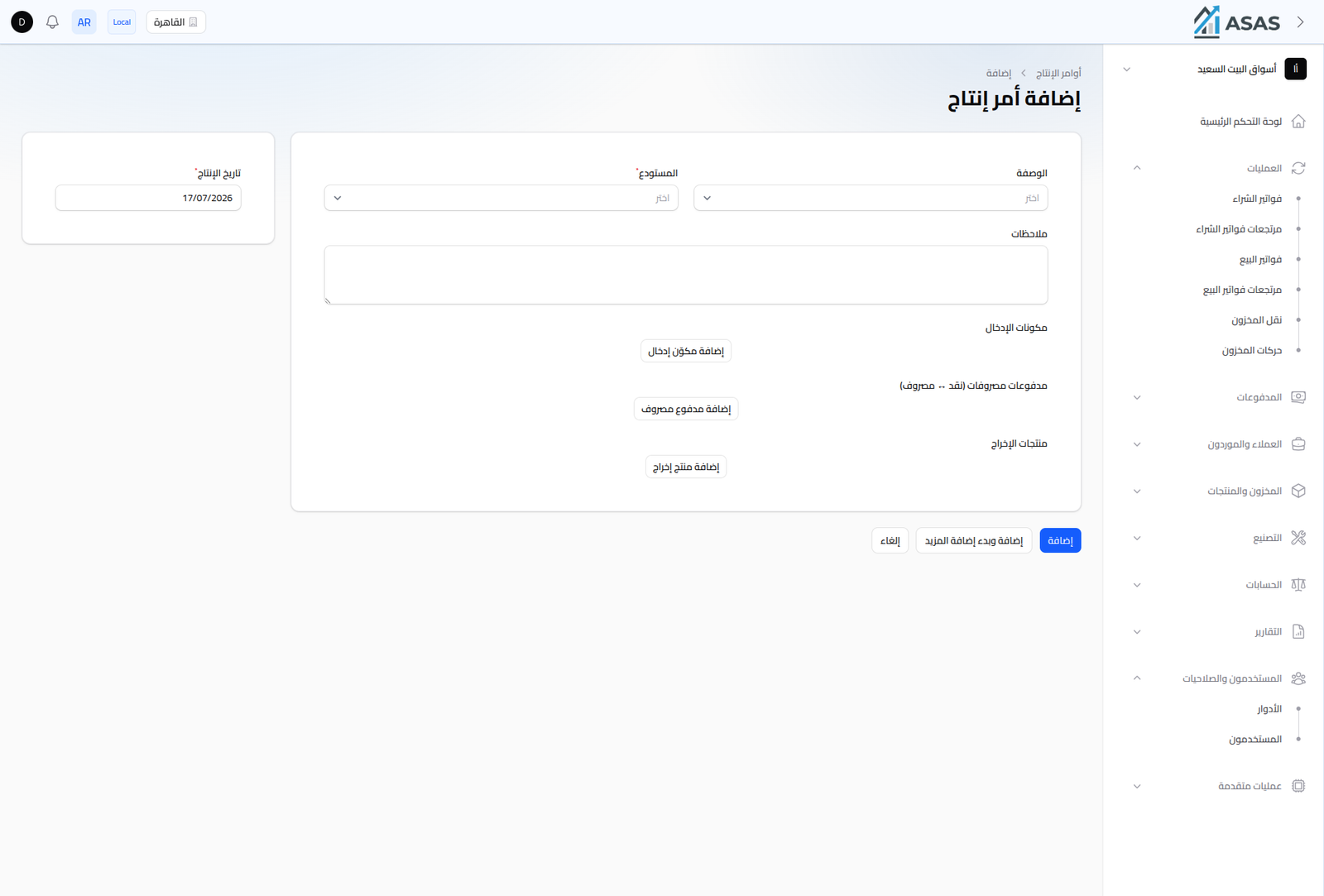
- Warehouse: the warehouse ingredients are deducted from and output is added to (required).
- Recipe: pick a recipe saved earlier (Recipes); the system pre-fills the input ingredients and output products from it, and you can still adjust quantities for this specific order.
- Production Date: pre-filled with today's date.
- Notes: optional free text.
- Input Ingredients: the ingredients deducted from stock (pre-filled from the recipe, editable).
- Expense Payments (Cash → Expense): record any extra cost for this batch (like production labor) via Add Expense Payment.
- Output Products: the resulting product(s) and their actual quantities for this batch.
Notes
- If the batch produced less or more than the recipe's default quantity, adjust the quantities in the input ingredients and output products for this specific order without affecting the original recipe.
- If material was damaged or lost during manufacturing, log it as a "Waste" movement — see Stock Movements Ledger.
- To reverse a completed production order, see the Production Order Returns list in the same Manufacturing section.
- For one-off conversions that don't need a saved recipe, use Conversion Orders instead.