Purchase Returns
Record merchandise returned to a supplier, whether linked to a specific purchase invoice or standalone.
Go to Operations → Purchase Returns and click Create:
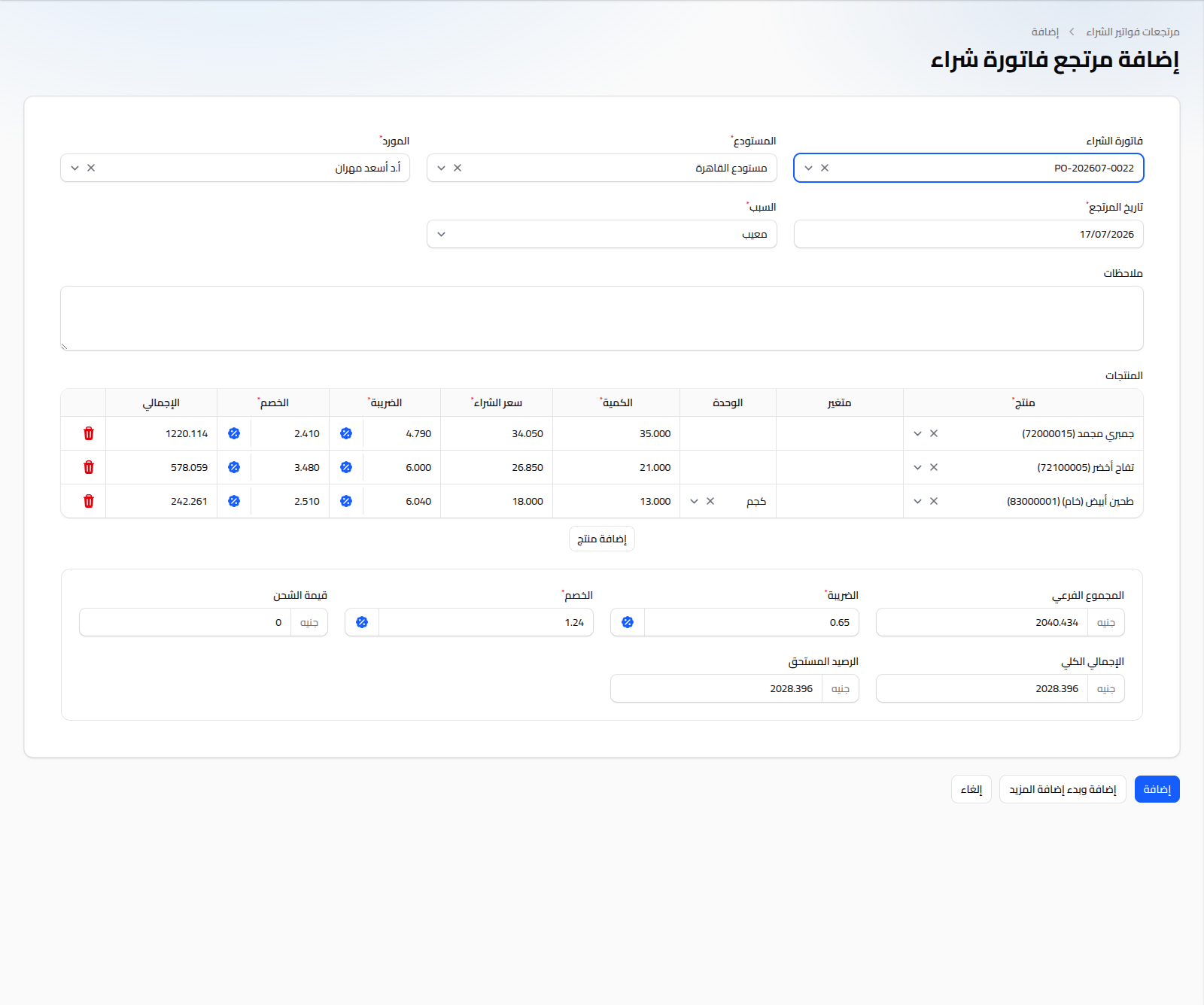
Linking a Return to an Invoice (Recommended)
Select a Purchase Invoice first. Once selected, Supplier and Warehouse are auto-filled from the invoice, and a row is added for each of its items with the original quantity and purchase price — you can adjust the returned quantity and prices as needed.
Fields
- Warehouse: (required) the warehouse the returned quantity is deducted from.
- Supplier: (required).
- Return Date: (required) defaults to today.
- Reason: (required) Defective, Wrong Item, Overstock, Expired, Damaged in Transit, Quality Issue, or Other.
- Notes: optional free text.
Product Table
Same logic as the purchase invoice (product, variant, unit, purchase price, tax/discount toggle between percentage and fixed amount). Below the table: subtotal, tax, discount, shipping amount, grand total, and outstanding balance (deducted from what's owed to the supplier).
Notes
- Saving the return deducts the returned quantity from the selected warehouse's stock.
- To settle any cash difference resulting from the return, see Supplier Payments.