Creating a Purchase Invoice
Record merchandise purchases from suppliers — the purchased quantity is added to the selected warehouse's stock automatically on save.
Go to Operations → Purchase Invoices and click Create:
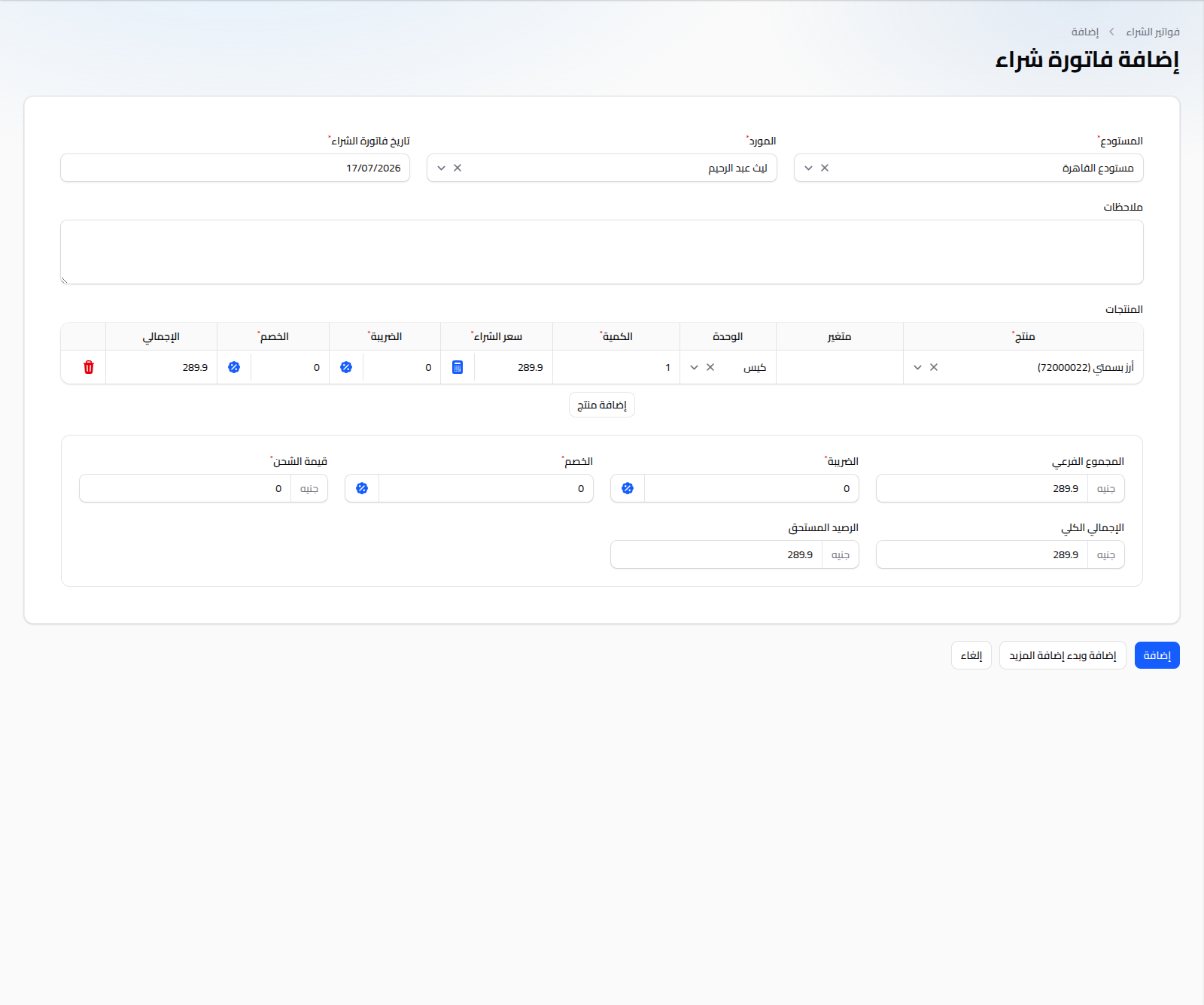
Fields
- Warehouse: (required) the warehouse the purchased quantity is added to.
- Supplier: (required).
- Purchase Date: (required) defaults to today.
- Notes: optional free text.
Product Table
For each row:
- Product, Variant, Unit: same logic as the sale invoice.
- Quantity: the unit quantity purchased.
- Purchase Price: auto-filled with the last recorded purchase price for this product/unit, editable. A calculator icon beside the field opens a unit cost breakdown (useful for allocating extra costs into the unit price).
- Tax and Discount: togglable between percentage % and fixed amount, same as the sale invoice.
- Total: calculated automatically per row.
Below the table: subtotal, tax, discount, shipping amount (editable, added to the total), grand total, and the supplier's outstanding balance.
Notes
- Saving the invoice increases available stock in the selected warehouse immediately.
- The purchase price recorded here is the source profit reports and "selling below cost" warnings rely on.
- To settle the outstanding amount owed to the supplier, see Supplier Payments.
- To return merchandise to a supplier, see Purchase Returns.