Customers
Record customers who buy on credit, or whose transactions and balance you want to track — instead of treating them as a cash customer every time.
Go to Customers & Suppliers → Customers and click Create:
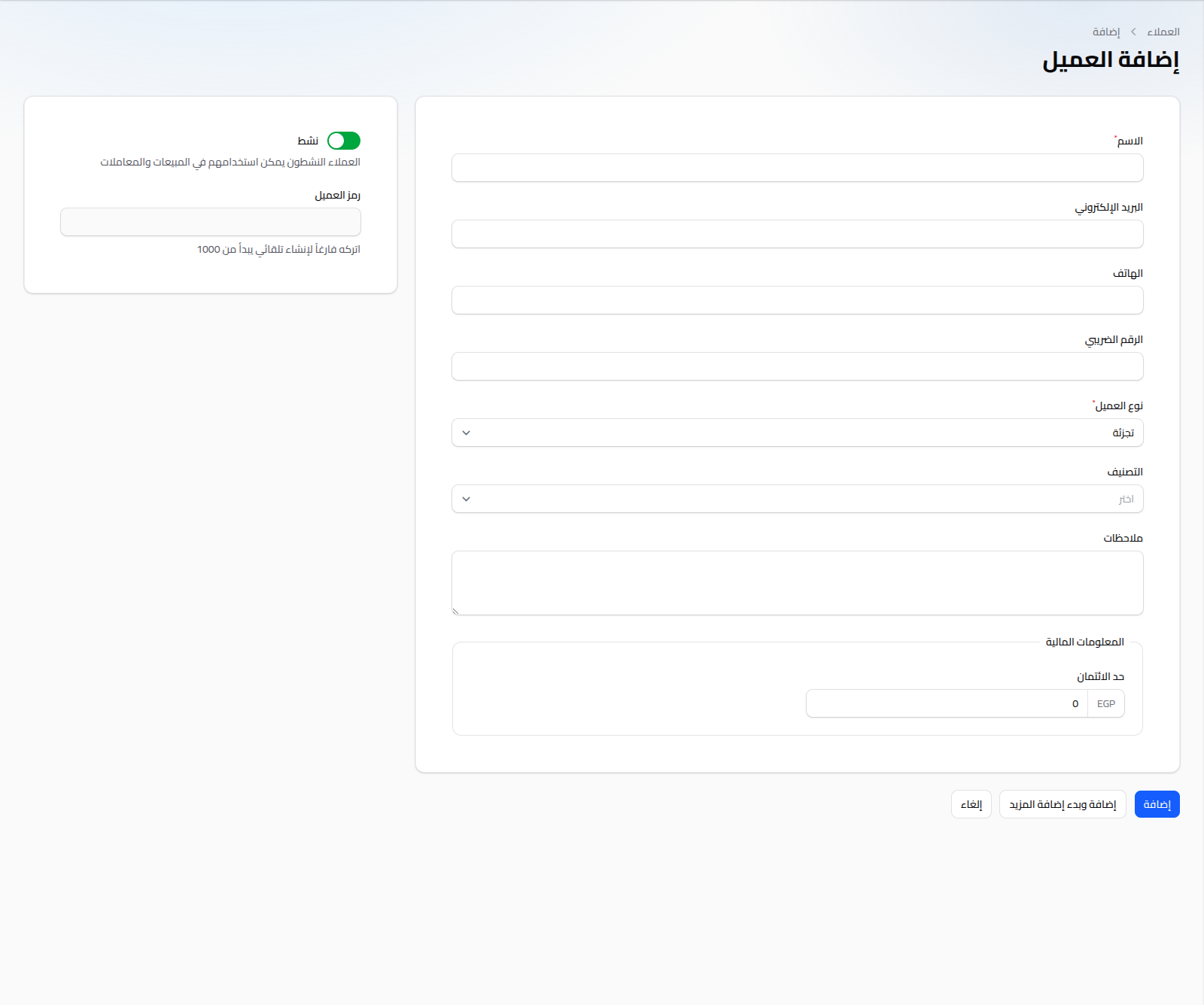
Fields
- Name: (required).
- Email: optional; must be unique within the same company if provided.
- Phone: optional.
- Tax Number: optional.
- Customer Type: (required) Wholesale, Semi-Wholesale, or Retail — determines the price tier automatically applied on sale invoices and the POS. Defaults to Retail.
- Classification: optional, chosen from active Customer Classifications — useful for grouping and filtering in reports.
- Notes: optional free text.
- Credit Limit: the maximum outstanding balance allowed for this customer (in EGP).
- Active: (toggle) inactive customers can't be used on new sales.
- Customer Code: auto-generated (a sequence starting at 1000), not editable.
When editing an existing customer, Account Balance and loyalty points fields also appear (read-only), along with the accounting account automatically linked to the customer.
Related Data (When Editing)
From the customer's edit/view page, tabs are available showing:
- The customer's sale invoices.
- Their sales returns.
- Their payments (see Customer Payments).
Notes
- For a detailed statement of balance movements, see Customer Balance Statement.
- When a customer is selected on a sale invoice or the POS, their type's price tier is automatically applied to every item.