Journal Entries
Journal entries are the complete accounting record of every financial movement in the system — every sale invoice, purchase invoice, return, payment voucher, account transfer, or inventory adjustment automatically creates a balanced (debit/credit) journal entry behind the scenes.
Journal entries can't be created manually from within the app — they're only generated automatically from source transactions. The available screens are view/tracking only.
Viewing a Specific Account's Entries
Open any "posting" account from the Chart of Accounts to see the Account Transactions tab at the bottom of the page:
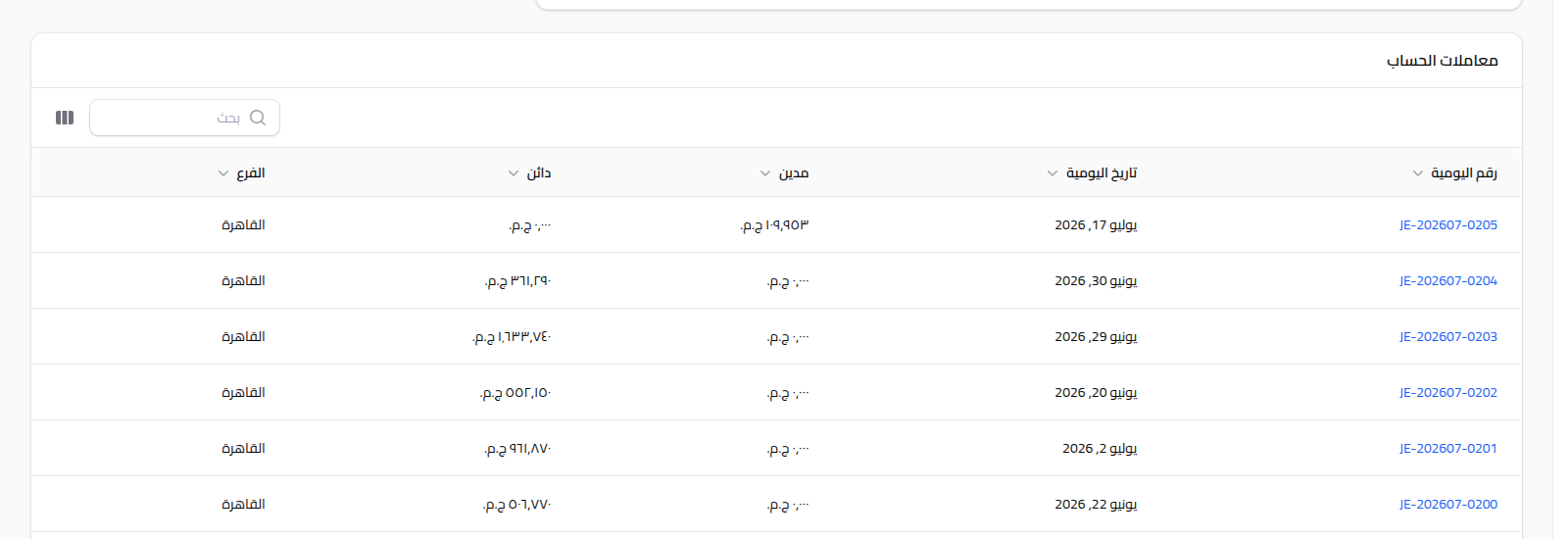
Each row represents one side (debit or credit) of a journal entry, with the journal number (a link), its date, and the branch. Click the journal number to jump to the source document (the invoice, voucher, etc.) that created this entry.
Full Journal Entries Report
To see every entry across the whole company, not just one account's, see Treasury & Accounting Reports.
Notes
- Every journal entry is always balanced (total debit = total credit).
- Journal numbers use the format
JE-YYYYMM-NNNN. - To see an account's balance over time, use the current balance shown at the top of the account page, or the Treasury & Accounting Reports.