Recipes (Bill of Materials)
A recipe describes how to manufacture a product (or several) from raw materials or other products — used later in Production Orders to automatically deduct the ingredients and add the output to stock, and in "Composite" product types to deduct their components directly on sale.
Go to Manufacturing → Recipes → Create.
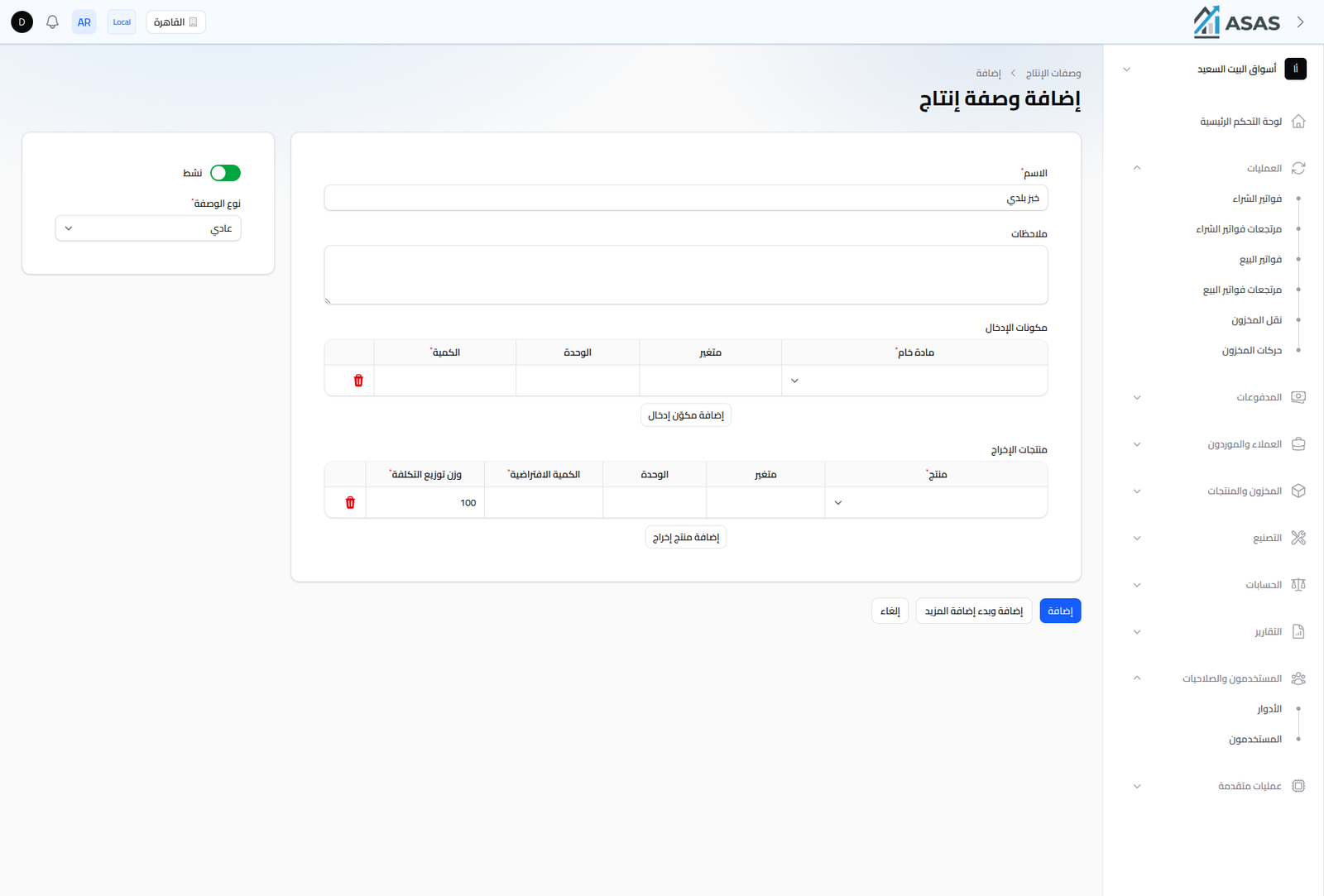
- Name: the recipe's name (required).
- Recipe Type: Normal or other types depending on the manufacturing setup.
- Notes: optional free text.
Input Ingredients
The raw materials or products consumed in manufacturing. For each row:
- Raw Material: the product being consumed (should be a "Raw Material" type or a regular product depending on setup).
- Variant and Unit: if the raw material has variants or multiple units.
- Quantity: how much of this material is needed to produce one batch of the recipe.
Output Products
A single recipe can produce more than one product (a main product plus secondary/by-products). For each row:
- Product, Variant, and Unit.
- Default Quantity: the expected quantity of this product per production batch.
- Cost Distribution Weight: when there's more than one output product, this determines how the ingredients' cost is spread across each output (defaults to 100 for a single product).
Notes
- Once created, use the recipe in Production Orders to run an actual manufacturing operation that deducts ingredients from stock and adds the output.
- See also Product Reports to track raw material consumption through recipes.