Expense Payments
Record a direct expense (shipping, rent, salaries, etc.) as a movement that deducts from a treasury account and posts to a specific expense account in the chart of accounts.
Go to Payments → Expense Payments and click Create:
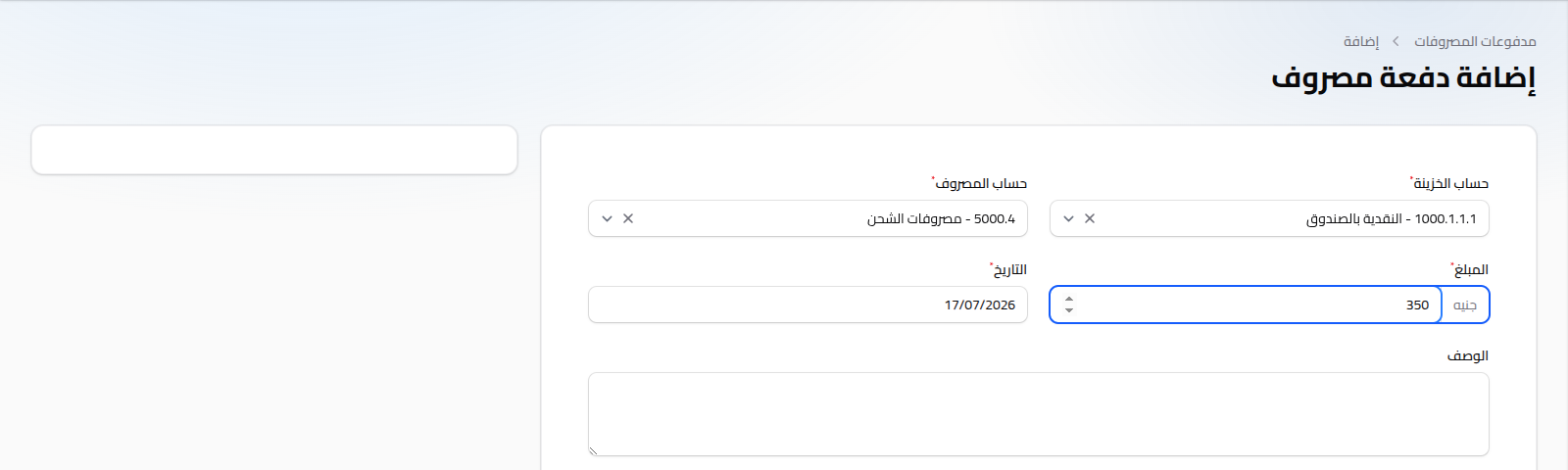
Fields
- Cash Account: (required) the cash/bank account the amount is deducted from.
- Expense Account: (required) chosen from Expense-type accounts in the chart of accounts (e.g. shipping expenses, salaries).
- Amount: (required).
- Date: (required) defaults to today.
- Description: optional free text.
- Payment Number: auto-generated, shown only after saving.
Notes
- To add a new expense account not yet in the list, create it first from the Chart of Accounts with type Expense.
- Every expense payment automatically creates a journal entry (see Journal Entries).
- This page is for direct expenses only, not merchandise purchase invoices — for those, see Creating a Purchase Invoice.