Customer Payments
Record amounts received from or paid to a customer as general vouchers against the customer's balance — no need to link them to a specific invoice (though optional linking is available).
Go to Payments → Customer Payments and click Create:
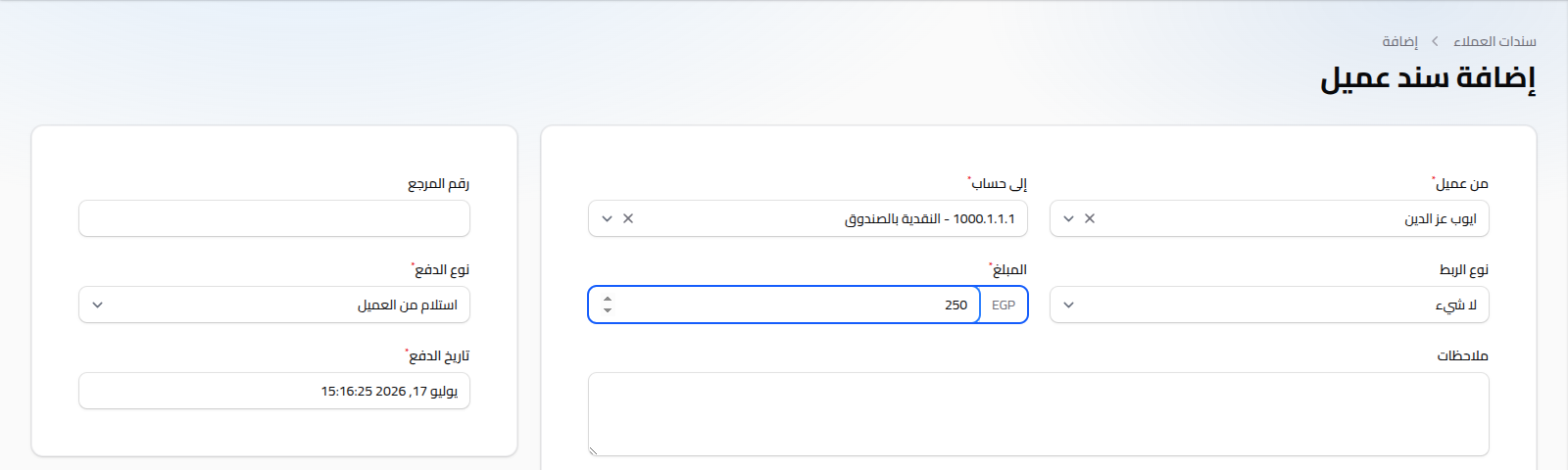
Fields
- From Customer: (required) the customer this voucher relates to.
- To Account: (required) the treasury account (cash/bank/e-wallet) the movement is recorded against.
- Link Type: None (default), Sale Invoice, or Sales Return.
- Choosing Sale Invoice or Sales Return reveals a picker (restricted to the selected customer's invoices/returns) plus a fill remaining amount button that instantly fills in the outstanding balance on the invoice (or the net refund for a return).
- Amount: (required).
- Notes: optional free text.
- Reference Number: optional, for a bank receipt or external reference.
- Payment Type: (required) Receive from Customer (default) or Pay to Customer.
- Payment Date: (required) defaults to the current time.
- Payment Number: auto-generated with a
CPAYprefix, shown only after saving.
Notes
- Payment logic is intentionally simple: every voucher is recorded as a general movement that updates the customer's balance directly, whether or not it's linked to an invoice.
- To see how these vouchers affect the customer's balance over time, see Customer Balance Statement.
- For supplier-side vouchers, see Supplier Payments.